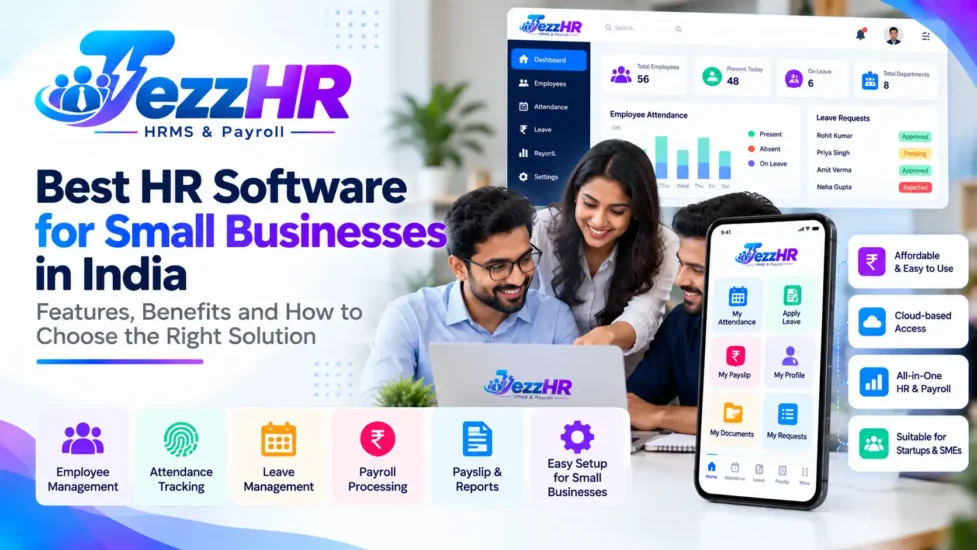
Running a small business involves managing employees, attendance, leave applications, salary processing, employee documents, and everyday HR responsibilities. When these activities are handled through spreadsheets, paper registers, and separate applications, administrative work can become increasingly difficult as the business grows.
HR software for small businesses in India helps organise these activities through a central digital platform. Depending on the product, businesses can manage employee records, attendance, leave, payroll, and other HR processes without maintaining disconnected records for every task.
For startups and growing companies, the objective is not simply to purchase software. It is to choose a solution that fits the organisation’s size, budget, policies, and future requirements.
This guide explains what HR software is, which features small businesses should prioritise, how HRMS software can improve day-to-day operations, and what to consider before choosing a solution such as TezzHR.
What Is HR Software for Small Businesses?
HR software is a digital system that helps businesses manage employee information and human resource processes.
A broader Human Resource Management System (HRMS) may combine multiple functions, including employee management, attendance tracking, leave administration, payroll, recruitment, performance management, and reporting.
A small business might initially need only employee records, attendance, leave, and payroll. As the team expands, it may require additional capabilities such as employee self-service, shift management, document management, or performance evaluation.
Instead of maintaining separate spreadsheets for every activity, an integrated HRMS can bring supported workflows together.
For example, an employee’s approved leave may be reflected in the attendance record, while the finalised attendance information may be used as an input during payroll preparation, depending on the system’s configuration.
Why Do Small Businesses in India Need HR Software?
Small businesses often operate with limited HR resources. Owners, accountants, office administrators, or a small HR team may handle several responsibilities simultaneously.
HR software can help make these processes more organised.
1. Centralise employee records
Employee information may include contact details, joining dates, designations, departments, reporting managers, and employment documents.
A central employee database reduces dependence on scattered files and helps authorised users find information more efficiently.
2. Simplify attendance management
Maintaining attendance manually can become difficult when employees work different shifts, attend multiple locations, or work outside the office.
Attendance software can record working hours through supported methods and help identify missing punches, absences, and other exceptions.
3. Organise leave applications
Employees need a consistent way to request leave, while managers need to review applications and plan staffing.
An integrated leave management system can help track applications, approvals, leave balances, and holidays according to configured policies.
4. Improve payroll preparation
Salary processing requires accurate employee information, salary structures, attendance inputs, and applicable deductions.
Payroll software can organise these inputs and automate supported calculations, reducing repetitive manual work. The payroll team should still review the calculations and verify applicable statutory requirements.
5. Reduce administrative repetition
When employee records, attendance, leave, and payroll are connected, the same information may not need to be entered repeatedly across different systems.
The extent of automation depends on the product’s features and integrations.
6. Support business growth
A process that works for a team of five may not be sufficient for a team of fifty or five hundred.
Choosing software with suitable employee limits, reporting, permissions, and expansion options can help businesses avoid unnecessary system changes as they grow.
Essential Features of HR Software for Small Businesses
Small businesses do not always need every available HR feature. Start by identifying the functions that solve your most frequent operational problems.
1. Employee Information Management
An employee management module provides a structured place to maintain workforce records.
Depending on the software, it may support:
- Employee profiles and identification numbers
- Department and designation records
- Reporting manager assignments
- Joining dates and employment status
- Contact information
- Employment documents
- Employee history and selected reports
Role-based access is important because not every user should be able to view or edit every employee record.
2. Attendance Management
Attendance management software helps businesses record and review employee attendance.
Depending on the solution, supported options may include biometric devices, mobile attendance, web check-ins, and location-based verification.
Useful capabilities may include daily attendance records, monthly summaries, late-arrival reports, missing-punch handling, and attendance regularisation.
Before choosing a system, verify device compatibility, supported mobile features, and the process for correcting attendance errors.
Read our guide to Employee Attendance Management Software.
3. Leave Management
A leave management module helps employees apply for leave and enables managers or HR personnel to review requests.
Depending on the software, features may include:
- Leave types and entitlements
- Online leave applications
- Manager approval workflows
- Leave balance tracking
- Holiday calendars
- Half-day leave
- Leave history and reports
The system should support the leave policies applicable to your organisation and employee categories.
Learn more in our guide to the Leave Management System.
4. Payroll Management
Payroll is a critical function for businesses that need to calculate employee salaries regularly.
Payroll software may support salary structures, earnings, deductions, payslips, payroll reports, and relevant statutory calculations.
Before selecting a payroll system, check whether it supports your salary components, payroll cycle, employee categories, required reports, and applicable Indian compliance requirements.
Read our detailed guide to Payroll Management Software in India.
5. Employee Self-Service Portal
An employee self-service portal allows employees to access supported HR services directly.
Depending on the product, employees may be able to view attendance, apply for leave, download payslips, review selected profile information, and submit HR requests.
Self-service can reduce routine enquiries and provide employees with better visibility into their HR information.
See our guide to the Employee Self-Service Portal.
6. Shift and Roster Management
Businesses with different working hours need an attendance system that can accommodate their shift patterns.
Depending on the software, shift management may include shift assignment, working-hour rules, weekly offs, shift changes, and shift-wise attendance reports.
This feature can be especially useful for retail stores, service companies, manufacturing units, and businesses operating extended hours.
7. Document Management
HR teams often maintain appointment letters, employee documents, policy records, and other employment-related files.
A document management feature can help organise supported records and control access to sensitive information.
Check the available storage limits, file formats, permissions, and retention options.
8. HR Reports and Dashboards
Reports help owners and HR administrators understand workforce information without manually combining spreadsheets.
Depending on the system, reports may cover employee headcount, attendance, leave, payroll summaries, and other HR metrics.
Useful reports should be easy to filter and export while respecting employee data access permissions.
9. Role-Based Access and Approvals
Even a small company needs clear responsibilities.
An HRMS should support suitable permissions for owners, HR administrators, managers, accountants, and employees. Where relevant, approval workflows can help control changes to employee records, attendance, leave, and payroll.
10. Mobile and Remote Access
Businesses with employees working across different locations may benefit from mobile-friendly HR services.
Check whether the product supports a responsive web interface, dedicated mobile applications, or both. Confirm the exact functions available on each platform before purchasing.
How Much Does HR Software Cost in India?
HR software pricing varies according to employee count, selected modules, integrations, implementation requirements, and support arrangements.
Common pricing models include monthly or annual subscriptions, per-employee charges, and customised business plans.
When comparing products, look beyond the headline subscription price. Consider:
- Employee limits and user licences
- Included HR and payroll modules
- Mobile and biometric integrations
- Data migration and implementation
- Training and customer support
- Additional branches or companies
- Customisation charges
- Renewal and upgrade costs
For a small business, the most economical choice is not necessarily the product with the lowest starting price. A system that covers the essential workflows without excessive complexity may offer better practical value.
Request a demonstration and a complete quotation based on your actual employee count and requirements.
How to Choose the Best HRMS Software for Your Small Business
Use the following process to compare solutions.
Step 1: Identify your current problems
List the HR tasks that consume the most time. These may include attendance collection, leave tracking, employee data maintenance, or salary preparation.
Prioritise software features that solve these problems first.
Step 2: Estimate your employee count
Determine how many employees will use the system now and how the workforce may change over the next few years.
Check employee limits, account types, and the cost of adding new employees.
Step 3: Decide which modules you need
For many small businesses, the starting requirements are employee management, attendance, leave, and payroll.
Other organisations may need shifts, employee self-service, document management, or additional modules.
Choose according to actual requirements rather than purchasing features you are unlikely to use.
Step 4: Verify Indian payroll requirements
Confirm that the software supports the payroll rules and reports relevant to your organisation.
Ask the vendor how statutory updates, salary components, deductions, and payroll corrections are handled.
Step 5: Evaluate usability
A system should be understandable to HR administrators, managers, and employees.
During a demonstration, test routine tasks such as adding an employee, approving leave, reviewing attendance, and preparing payroll.
Step 6: Check integration options
Determine whether the software integrates with your existing attendance devices, accounting systems, or other business applications.
Do not assume that every integration is included in the standard plan.
Step 7: Review security and data handling
Employee records and salary information require appropriate protection.
Review access permissions, authentication, backup practices, data handling, and the vendor’s support arrangements.
Step 8: Calculate the total cost
Compare subscription fees with implementation, training, integrations, support, and renewal costs.
Choose a solution that fits your budget while meeting your essential requirements.
Cloud-Based HR Software vs Spreadsheets
| Area | Spreadsheets and manual processes | HRMS software |
|---|---|---|
| Employee records | Maintained in separate files | Can be centralised |
| Attendance | Often collected and reconciled manually | Supported digital recording and reports |
| Leave approvals | Email or message-based coordination | Configurable approval workflows |
| Payroll | Repeated data entry may be required | Supported calculations and integration |
| Employee access | Information shared manually | Self-service features where available |
| Reports | Prepared by combining data | Generated using available reports |
| Permissions | Often managed through file access | Role-based permissions where supported |
| Scalability | File management can become cumbersome | Depends on plan and product capabilities |
Spreadsheets may be sufficient for a very small team with simple processes. An HRMS becomes more valuable when several HR activities need to work together.
Common Mistakes to Avoid When Buying HR Software
Choosing based only on price
A low subscription fee does not guarantee that the product includes your required attendance, payroll, or approval features.
Buying unnecessary modules
More features are not always better. Start with your core requirements and expand when there is a clear business need.
Ignoring employee adoption
If employees and managers find the system difficult to use, they may continue relying on manual processes. Include training and clear operating instructions in the implementation plan.
Failing to verify payroll calculations
Test representative salary structures, attendance scenarios, deductions, and payslips before processing live payroll.
Overlooking data security
Review permissions and data handling before uploading confidential employee information.
Not planning for growth
Consider whether the software can accommodate additional employees, locations, reporting structures, and workflows without a major migration.
Is TezzHR Suitable for Small Businesses?
TezzHR is the HRMS and payroll product from TezzSoft. Small businesses evaluating HR software can start by reviewing the TezzSoft HR & Payroll Management Software page.
When evaluating TezzHR, consider whether its current configuration meets your requirements for:
- Employee record management
- Attendance tracking
- Leave applications and approvals
- Payroll processing
- Payslips and payroll reports
- Employee self-service
- Shift and working-hour management
- Reporting and administrative permissions
Confirm the availability of individual features, integrations, pricing, and employee limits with the TezzSoft team before making a purchase decision.
You can visit TezzHR to explore the product and enquire about a demonstration.
Frequently Asked Questions About HR Software for Small Businesses
1. What is the best HR software for small businesses in India?
The best HR software depends on your employee count, required modules, budget, payroll needs, and reporting structure. Compare products using real business scenarios and verify the features included in each plan.
2. Is HRMS software useful for startups?
Yes. Startups can use HRMS software to organise employee information, manage leave and attendance, and streamline payroll preparation as their workforce grows.
3. What features should small businesses look for in HR software?
Start with employee management, attendance, leave management, payroll, reporting, and appropriate access controls. Employee self-service and mobile access may also be valuable.
4. Can HR software manage attendance and payroll together?
Many HRMS platforms connect attendance with payroll. Approved attendance information can be used as an input for salary calculations, subject to the software’s capabilities and configuration.
5. Is cloud-based HR software better than spreadsheets?
Cloud-based software may provide centralised records, access controls, digital workflows, and reporting that are difficult to maintain consistently in separate spreadsheets. The right choice depends on the organisation’s requirements and the product’s capabilities.
6. Can small businesses use employee self-service?
Yes. Where supported, employee self-service allows employees to access selected HR information and submit requests without depending on HR for every routine task.
7. How much does HRMS software cost in India?
Pricing varies by vendor, employee count, modules, integrations, and support. Request a detailed quotation that includes setup, training, renewals, and any additional charges.
8. How long does HRMS implementation take?
Implementation time depends on employee data quality, required modules, integrations, policy configuration, and training. Ask the vendor for a realistic timeline based on your requirements.
9. Is HRMS software suitable for businesses with multiple branches?
Many systems support multiple departments or locations. Confirm that the product can manage the required branches, employee assignments, attendance rules, and reporting access.
10. Where can I learn more about TezzHR?
Visit TezzHR or the TezzSoft HR & Payroll Management Software page to review the product and ask about available features.
Conclusion
HR software can help small businesses in India organise employee records, attendance, leave, payroll, and other routine HR activities through a more consistent process.
The right HRMS should solve your current problems, fit your budget, protect employee information, and support your business as it grows.
Before choosing a product, list your essential requirements, test the main workflows, verify payroll capabilities, and compare the total cost of ownership.
If you are evaluating an integrated HR and payroll solution, explore TezzSoft HR & Payroll Management Software to see whether TezzHR fits your organisation.
Related Articles
- Best HRMS Software in India: Features, Benefits and How to Choose
- Payroll Management Software in India: Salary Processing, Payslips and Compliance
- Employee Attendance Management Software: A Complete Guide
- Leave Management System: Automate Employee Leave Requests and Approvals
- Employee Self-Service Portal: Features and Benefits
Editorial note: Confirm TezzHR’s current features, pricing, and integrations before publishing any specific product claims.