Managing employee attendance is an important part of running a business. HR teams need to know who is present, who is absent, whether employees arrived on time, how shifts are managed, and how attendance affects salary calculations.
When attendance is recorded in paper registers or separate spreadsheets, the process can become difficult to manage. Missing entries, incorrect working hours, unapproved leave, and manual calculations may create additional work for HR and payroll teams.
Employee attendance management software helps businesses record, monitor, and organise attendance through a central system. Depending on the solution, employees may mark attendance through biometric devices, mobile applications, web portals, or other authorised methods.
For Indian businesses with office employees, field staff, multiple branches, or shift-based teams, an attendance management system can help establish consistent processes and improve visibility into workforce attendance.
In this guide, we explain how attendance software works, which features matter most, how to choose the right system, and how attendance data can be connected with HRMS and payroll software.
What Is Employee Attendance Management Software?
Employee attendance management software is a digital system used to record employee attendance, track working hours, manage shifts, review absences, and prepare attendance reports.
Depending on the software, it may support biometric attendance devices, mobile check-ins, web-based attendance, GPS-based verification, leave management, overtime calculations, and payroll integration.
For example, a company may require office employees to record attendance through a biometric device while field employees use an authorised mobile application. HR can then review the attendance information through a central dashboard.
Instead of collecting records from different locations and combining them manually, the organisation can use a consistent process to review attendance and identify missing or unusual entries.
An attendance management system is useful for:
- Small and medium-sized businesses
- Corporate offices
- Manufacturing units
- Hospitals and clinics
- Retail stores and multi-branch businesses
- Educational institutions
- Field sales and service teams
- Organisations with shift-based employees
The right system depends on the organisation’s working arrangements, attendance policies, infrastructure, and reporting requirements.
Why Do Businesses Need an Attendance Management System?
Employee attendance affects workforce planning, productivity, leave administration, and payroll preparation.
Here are some common reasons businesses move from manual registers to attendance software.
1. Reduce manual record keeping
Paper registers and spreadsheets require regular updates and careful record maintenance.
Attendance software can centralise records and reduce repetitive data entry, particularly when employees work across multiple departments or locations.
2. Improve attendance accuracy
Missing punches, duplicate entries, incorrect timings, and forgotten check-ins can create discrepancies.
A digital system can flag certain exceptions and allow authorised users to review corrections before attendance is finalised.
3. Track late arrivals and early departures
Businesses often have defined working hours, grace periods, and shift policies.
Attendance software can help identify late arrivals, early departures, and other exceptions based on configured rules.
The system should follow the organisation’s approved policies rather than applying arbitrary deductions.
4. Simplify monthly payroll preparation
Attendance information can influence payable working days, overtime, and loss-of-pay calculations.
When attendance and payroll systems are integrated, HR teams can use approved attendance records as payroll inputs without repeatedly transferring data between spreadsheets.
5. Manage employees across multiple locations
Businesses with several branches may find it difficult to collect attendance reports from every location.
A central attendance system can provide consolidated visibility, subject to the system’s configuration and connectivity.
6. Improve reporting and accountability
Attendance reports can help managers identify patterns such as repeated late arrivals, absenteeism, incomplete punches, and staffing gaps.
These reports should be interpreted alongside approved leave, shift schedules, holidays, and other relevant information.
Key Features of Employee Attendance Management Software
Not every business requires every attendance feature. Evaluate the following capabilities according to your operational needs.
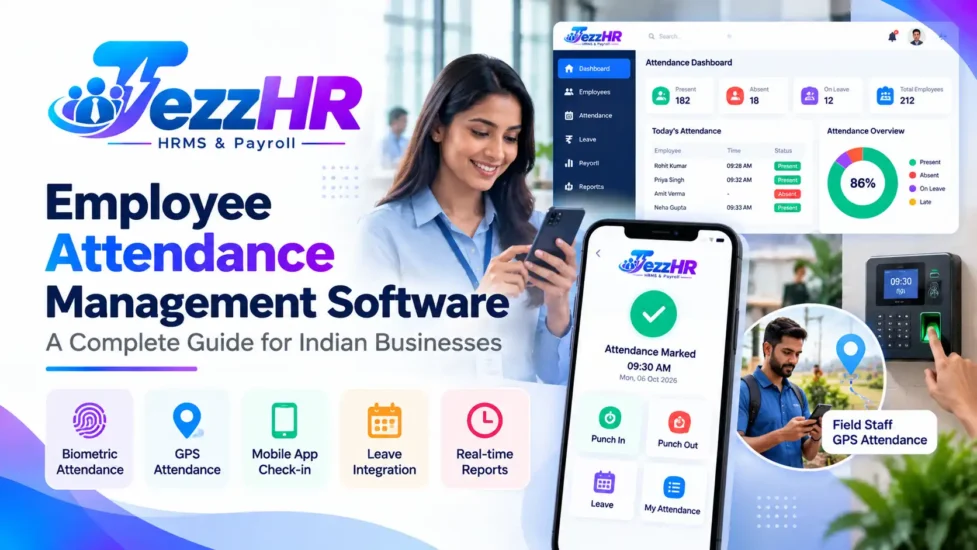
1. Biometric Attendance Management
Biometric attendance systems use supported devices to identify employees through methods such as fingerprint or facial recognition.
Employees register their attendance through the configured device, and the resulting records are transferred to the attendance system according to the supported integration.
Useful capabilities may include:
- Employee registration and device mapping
- Attendance punch recording
- In-time and out-time tracking
- Device-wise attendance reports
- Multiple device management
- Attendance synchronisation
- Exception and correction workflows
Before purchasing biometric attendance software, check device compatibility, integration requirements, data protection controls, and the process for handling device failures.
Biometric attendance should be implemented with appropriate privacy safeguards and applicable legal requirements in mind.
2. Mobile Attendance Application
A mobile attendance app allows employees to record attendance through an authorised smartphone.
This can be helpful for businesses where employees do not always work at a fixed desk or where a central biometric device is impractical.
Depending on the product, mobile attendance features may include:
- Mobile check-in and check-out
- Attendance history
- Time-stamped attendance records
- Location-based verification
- Attendance correction requests
- Access to selected employee services
Check whether the app supports the mobile platforms your employees use and how it handles poor connectivity, device changes, and missed check-ins.
3. GPS-Based Attendance for Field Employees
Businesses with sales representatives, service engineers, delivery teams, and other field staff may need location-based attendance verification.
A GPS-enabled attendance workflow can record a location when an employee checks in or out, if the application supports that functionality and the required permissions are granted.
Possible use cases include:
- Recording attendance at a customer site
- Verifying check-ins against an authorised work location
- Reviewing location information associated with an attendance entry
- Monitoring field attendance exceptions
- Preparing attendance reports for mobile teams
Important: GPS check-in and continuous background location tracking are different capabilities. Confirm which one the software supports. Location collection should be transparent, proportionate to the business requirement, and governed by appropriate employee privacy and access policies.
4. Shift and Roster Management
Businesses that operate different shifts need an attendance system that understands scheduled working hours.
For example, a hospital may have morning, evening, and night shifts, while a manufacturing unit may operate rotating schedules.
Depending on the software, shift management may support:
- Multiple shift definitions
- Employee-to-shift assignment
- Shift timings and breaks
- Weekly offs
- Shift changes
- Late arrival rules
- Overnight shift handling
- Shift-wise attendance reports
Before implementation, test overnight shifts, holidays, cross-midnight attendance, and changes to an employee’s assigned schedule.
5. Leave Management Integration
Attendance records cannot be interpreted correctly without considering approved leave and holidays.
For example, an employee who is absent on an approved leave day should not automatically be treated the same as an employee who has missed work without authorisation.
An integrated attendance and leave system can help connect:
- Leave applications
- Manager approvals
- Leave balances
- Holiday calendars
- Weekly offs
- Attendance regularisation
- Unpaid leave records
This helps HR teams review attendance using the organisation’s approved policies.
6. Overtime and Working-Hour Calculations
Some businesses need to track additional working hours for eligible employees.
Attendance software may calculate recorded working time and identify potential overtime based on shift schedules and configured rules.
The system should distinguish recorded hours from approved payable overtime where required by the organisation’s policies.
Businesses should verify the applicable overtime rules, employee eligibility, and approval process before using these calculations for payroll.
7. Real-Time Attendance Dashboard
An attendance dashboard gives authorised users an overview of workforce attendance.
Depending on the software, it may show:
- Employees marked present
- Employees absent
- Late arrivals
- Employees on approved leave
- Missing attendance punches
- Location-wise attendance summaries
- Pending regularisation requests
A dashboard should provide actionable information without exposing sensitive employee data to users who do not need access.
8. Attendance Reports and Exports
Attendance reports help HR and managers review attendance before payroll processing.
Useful reports may include:
- Daily attendance register
- Monthly attendance summary
- Employee-wise attendance history
- Late arrival and early departure report
- Absence report
- Shift-wise attendance
- Overtime summary
- Attendance correction history
- Department-wise attendance
Check whether the system supports the required date ranges, filters, export formats, and access permissions.
9. Attendance Regularisation and Approval
Employees sometimes forget to check in, experience device issues, or record incorrect attendance timings.
An attendance regularisation feature allows employees to submit a correction request with an explanation and supporting information where required.
A typical workflow is:
- The employee submits an attendance correction request.
- The reporting manager reviews the request.
- The manager approves or rejects it according to company policy.
- HR reviews exceptions where necessary.
- The approved attendance record is updated, with an appropriate audit trail.
This process is more traceable than allowing unrestricted changes to attendance records.
How Does Attendance Software Work?
A typical attendance management workflow consists of six steps.
Step 1: Set up employees and policies
Create employee records and configure departments, working hours, shifts, weekly offs, holidays, and attendance rules.
Step 2: Configure attendance methods
Set up the supported attendance methods, such as biometric devices, web check-ins, or mobile attendance.
For location-based attendance, define the applicable permissions and verification rules.
Step 3: Record attendance
Employees record check-in and check-out times through the configured method.
The system stores attendance information according to its capabilities and settings.
Step 4: Review exceptions
HR or authorised managers review missing punches, late arrivals, unusual timings, and attendance correction requests.
Approved leave, holidays, shift assignments, and other relevant circumstances should be considered before classifying an absence.
Step 5: Finalise attendance
After corrections and approvals are completed, HR prepares the attendance summary for the relevant period.
Step 6: Share approved inputs with payroll
If payroll integration is available, the finalised attendance records can be used for salary calculations, payable days, and configured deductions.
The payroll team should review the resulting calculations before finalising salaries.
Attendance Management Software vs Manual Attendance Register
| Feature | Manual register or spreadsheet | Attendance management software |
|---|---|---|
| Attendance recording | Written or manually entered | Digital recording through supported methods |
| Late arrival tracking | Often reviewed manually | Can be flagged using configured rules |
| Multiple branches | Requires consolidated records | May provide centralised reporting |
| Leave coordination | Separate records may be required | Can integrate with leave workflows |
| Attendance corrections | Often handled informally | May provide approval and audit trails |
| Payroll preparation | Manual data transfer may be needed | Can integrate with payroll |
| Reports | Compiled manually | Generated from recorded attendance |
| Mobile workforce | Difficult to verify remotely | May support mobile or location-based attendance |
Manual registers may be sufficient for very small teams with simple requirements. Software becomes more useful when the organisation needs consistent policies, multiple attendance methods, centralised reports, or payroll integration.
How Attendance Management Software Connects with Payroll
Attendance and payroll are closely related, but they perform different functions.
Attendance software records working time, check-in and check-out events, absences, shifts, and related exceptions.
Payroll software uses approved attendance information, along with salary structures and other payroll inputs, to calculate employee earnings and deductions.
For example, consider an employee whose monthly salary calculation depends on attendance, approved leave, and unpaid leave. An integrated system can transfer the approved attendance summary to payroll, reducing the need for manual data entry.
The payroll team must still verify the employee’s salary structure, applicable rules, and any required adjustments.
To learn more about salary calculations, payslips, and payroll workflows, read our guide to Payroll Management Software in India.
How to Choose the Best Attendance Management Software in India
Before purchasing an attendance system, compare the features against your real working environment.
1. Identify your employee categories
Determine whether you need to manage office staff, factory workers, shift-based employees, field teams, remote workers, or a combination of these groups.
Different employee categories may require different attendance methods.
2. Choose the right attendance method
Decide whether biometric devices, mobile check-ins, web attendance, GPS verification, or a combination is appropriate.
Do not pay for capabilities that your organisation does not need.
3. Check shift and leave rules
Verify that the system supports your working hours, weekly offs, holidays, leave policies, overtime rules, and attendance correction process.
4. Evaluate payroll integration
If attendance affects salary calculations, check whether the software connects to your payroll system or provides reliable exports.
Ask the vendor to demonstrate the complete attendance-to-payroll workflow.
5. Review mobile and location capabilities
For field teams, check mobile compatibility, location permissions, connectivity requirements, and the exact location data collected.
Confirm whether the solution records location only during check-in or offers additional tracking features.
6. Review reporting and permissions
Check whether managers can access the attendance information for their teams while HR administrators retain the appropriate broader access.
Reports should be easy to export and sufficiently detailed for your operational needs.
7. Compare pricing and implementation
Evaluate subscription costs, employee limits, device integrations, mobile features, implementation fees, support, and training.
Ask about the process for importing employee data and configuring attendance policies.
8. Test the system before implementation
Request a demonstration using realistic scenarios such as missed punches, overnight shifts, approved leave, late arrivals, mobile check-ins, and payroll preparation.
A practical test can reveal limitations that may not be obvious from a feature list.
How TezzHR Can Support Employee Attendance Management
TezzHR is the HRMS and payroll product from TezzSoft. Its HR & Payroll Management Software offering includes attendance-related functionality alongside employee management, leave, and payroll features.
When evaluating TezzHR for your organisation, review the available configuration for:
- Attendance records: Maintaining employee attendance information.
- Biometric or mobile attendance: Confirming supported devices, app functionality, and integrations.
- Shift and working-hour rules: Checking which scheduling and attendance calculations are available.
- Leave coordination: Reviewing how approved leave interacts with attendance.
- Attendance reports: Checking the available summaries and reporting options.
- Payroll integration: Understanding how attendance information contributes to payroll calculations.
- Employee access: Reviewing available self-service and attendance-history features.
The exact capabilities depend on the product configuration and supported integrations. Confirm any required GPS, device, offline attendance, or advanced tracking functionality with the TezzSoft team before implementation.
Explore TezzHR or visit the HR & Payroll Management product page to learn more.
Common Attendance Management Mistakes to Avoid
Applying attendance rules inconsistently
Different employees should not be subjected to arbitrary rules. Configure approved policies and apply them consistently to the relevant employee categories.
Ignoring missed punches
A missing check-in does not always mean an employee was absent. Establish a regularisation process and review supporting information before finalising records.
Treating every late arrival as unpaid leave
Attendance exceptions should be evaluated under the organisation’s policy and applicable employment requirements. Avoid automatic salary deductions without the necessary review.
Ignoring overnight shifts
Employees working night shifts may check in on one calendar date and check out on another. Test these scenarios before using attendance calculations for payroll.
Giving too many users administrative access
Restrict attendance editing and employee data access to authorised users. Maintain appropriate records of corrections and approvals.
Collecting unnecessary location information
Location tracking should have a clear business purpose. Explain what is collected, when collection occurs, who can access it, and how long records are retained.
Frequently Asked Questions About Employee Attendance Management Software
1. What is employee attendance management software?
It is software that records and manages employee attendance, working hours, absences, shifts, and related reports. Depending on the product, it may support biometric devices, mobile attendance, GPS verification, and payroll integration.
2. Which attendance management software is best for Indian businesses?
The right solution depends on employee count, working arrangements, attendance methods, shift rules, payroll integration, reporting needs, and budget. Compare products using realistic business scenarios rather than relying only on feature lists.
3. Can attendance software integrate with payroll?
Many HRMS platforms connect attendance with payroll. Approved attendance information can be used to calculate payable days, overtime, and configured loss-of-pay amounts, subject to the system’s capabilities and business rules.
4. What is biometric attendance software?
Biometric attendance software works with supported biometric devices to record employee attendance using identification methods such as fingerprints or facial recognition. Businesses should review device compatibility, privacy safeguards, and applicable requirements before implementation.
5. Can employees mark attendance using a mobile app?
Many attendance applications support mobile check-ins and check-outs. Depending on the software, additional features may include location verification, attendance history, and correction requests.
6. How does GPS attendance work?
GPS attendance can record location information associated with an employee’s check-in or check-out when supported by the app and permitted by the device. The organisation should explain the purpose of location collection and apply appropriate access and retention controls.
7. Can attendance software manage multiple branches?
Some systems support centralised attendance management across multiple locations. Confirm branch configuration, employee assignments, device integrations, and consolidated reporting with the vendor.
8. Does attendance software calculate overtime?
Some systems can calculate recorded working hours and identify potential overtime according to configured rules. Confirm approval workflows and applicable overtime requirements before using these calculations for payroll.
9. Is attendance management software suitable for small businesses?
Yes. Small businesses can use attendance software to organise records, manage leave-related exceptions, and simplify monthly payroll preparation. Choose a system that matches the size and complexity of your workforce.
10. Where can I learn more about TezzHR?
Visit the TezzHR website or the TezzSoft HR & Payroll Management product page to review the product and contact the team about a demonstration.
Conclusion
Employee attendance management software helps businesses establish a consistent way to record attendance, manage shifts, review exceptions, and prepare workforce reports.
For organisations with multiple branches, shift-based teams, or field employees, the right system can reduce manual administration and improve visibility into attendance records. Connecting approved attendance information with payroll can also make salary preparation more structured.
Before selecting a solution, review your attendance policies, required devices, mobile functionality, reporting needs, data protection requirements, and payroll integration.
If you want to bring employee attendance, leave, and payroll workflows together, explore TezzSoft HR & Payroll Management Software to see whether TezzHR meets your requirements.
Related articles
- Best HRMS Software in India: Features, Benefits and How to Choose
- Payroll Management Software in India: Salary Processing, Payslips and Compliance
- Leave Management System: Automating Employee Leave Requests
Editorial note: Confirm the exact attendance methods and integrations available in TezzHR before publication. Review applicable employment, privacy, and data protection requirements before implementing biometric or location-based attendance.